After allocating more virtual drive space in VBoxMange, the Virtual machine’s partition will need to be extended, or a new partition will need to be created to use the newly allocated space. In this blog I will use GParted to extend the primary volume and create a new partition. You can’t modify a partition that you booted from so you need to boot from another drive that has GParted on it. I will use the Ubuntu install image to boot and run Gparted.
Here is VirtualBox Manger showing that more drive space has been allocated.

* I had an issue with Gparted not seeing the new unallocated space after I allocated it in VBoxManage. I was able to fix the issue by deleting the VM snapshot I had.
Use VirtualBox manger to point the optical drive to the Ubuntu iso.
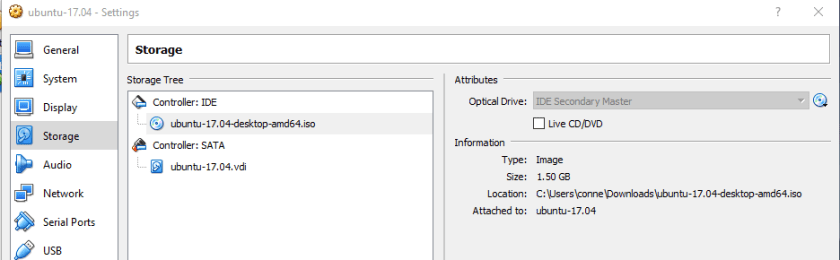
Use VirtualBox manger to make sure the boot order has the optical drive before the hard drive.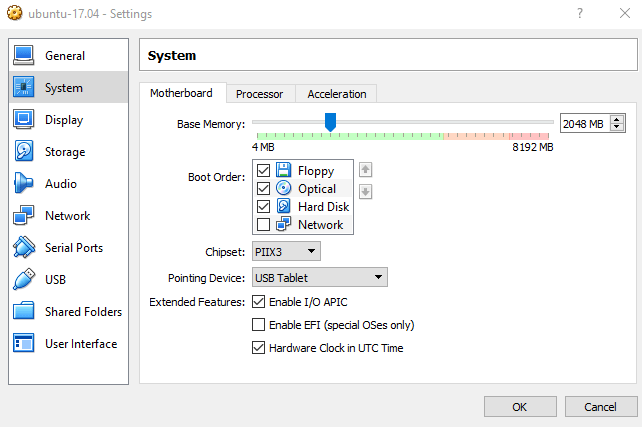
Start the virtual machine. Select “Try Ubuntu”
![2017-09-15 13_11_38-ubuntu-17.04 (Snapshot 1) [Running] - Oracle VM VirtualBox](https://crispianconner.com/wp-content/uploads/2017/09/2017-09-15-13_11_38-ubuntu-17-04-snapshot-1-running-oracle-vm-virtualbox.png?w=840)
When Ubuntu is up, search for and run GParted.
![2017-09-15 13_19_18-ubuntu-17.04 (Snapshot 1) [Running] - Oracle VM VirtualBox](https://crispianconner.com/wp-content/uploads/2017/09/2017-09-15-13_19_18-ubuntu-17-04-snapshot-1-running-oracle-vm-virtualbox.png?w=840)
The unallocated space will be visible.
![2017-09-15 14_51_20-ubuntu-17.04 [Running] - Oracle VM VirtualBox](https://crispianconner.com/wp-content/uploads/2017/09/2017-09-15-14_51_20-ubuntu-17-04-running-oracle-vm-virtualbox.png?w=840)
Click on the partition you want to extend. in this case /dev/sda. Go to partition > resize/move then move the slider to the size you would like to make the partition.
![2017-09-15 14_53_02-ubuntu-17.04 [Running] - Oracle VM VirtualBox](https://crispianconner.com/wp-content/uploads/2017/09/2017-09-15-14_53_02-ubuntu-17-04-running-oracle-vm-virtualbox.png?w=840)
Slide it over to the size you want.
![2017-09-15 14_57_25-ubuntu-17.04 [Running] - Oracle VM VirtualBox](https://crispianconner.com/wp-content/uploads/2017/09/2017-09-15-14_57_25-ubuntu-17-04-running-oracle-vm-virtualbox.png?w=840)
To make a new partition go to partition > new. Slide the size of the partition to the size you want and name the new partition.
Hit the green check to apply the changes.
![2017-09-15 15_00_55-ubuntu-17.04 [Running] - Oracle VM VirtualBox](https://crispianconner.com/wp-content/uploads/2017/09/2017-09-15-15_00_55-ubuntu-17-04-running-oracle-vm-virtualbox.png?w=840)
Exit Ubuntu, eject the virtual machines optical drive and restart normally. Check the Ubuntu Disk Manager to verify your changes.
![2017-09-15 15_05_59-ubuntu-17.04 [Running] - Oracle VM VirtualBox](https://crispianconner.com/wp-content/uploads/2017/09/2017-09-15-15_05_59-ubuntu-17-04-running-oracle-vm-virtualbox.png?w=840)
It worked!
 Cris Conner's SQL Blog
thanks I new to learn nodejs and its very hard to do it on windows so, I try it on ubuntu virtualbox suggested minima 10Gb is very fast consumed,
very easy to follow your guide , May god bless you
LikeLike