There may come a time when a DBA or Server Admin may need to grant themselves system admin privileges on a SQL Server instance on which they do not have access or only have limited access to. Some examples I have faced is taking over administrative duties for a new business unit where developers built their own development instances and where Server Admins would install 3rd party application software that installs a SQL Server instance along with it. This leads to the person who did the install only making themselves sa and them using who knows what for logins and passwords. This is why DBAs should install ALL SQL instances. The DBAs should access everything through AD security groups and save ALL accounts in a password safe. The DBA security group should be added as a system admin on all SQL instances during the installation. To take this idea a step further, a Privileged Access Management System could be considered for a higher level of security, but I will leave PAM for a future blog post.
Local server administrators can gain sa access to a SQL instance by starting the instance with single user(-m), or minimal configuration(-f) startup parameters. A server admin can do this either by setting the startup parameters in SQL Server Configuration Manger or by starting the instance using Net Start with the parameters. Keep in mind that only one admin account at a time can connect when SQL is started in single user mode. Make sure you stop and disable SQL agent or it may take the only available connection. Even with the agent stopped you may still have an issue with an unknown process taking the only connection. Some things you can try to help you get the single connection are to add the Net Start and SQLCMD to run in the same line or you can disable TCP/IP since you can use can use shared memory on the server.
Stop and disable SQL Agent.

One way you can start SQL in single user mode is to set the startup parameter in SQL configuration manger. 
I think the most straightforward way is to use the cmd line. Below you can see all the commands needed to accomplish this task. Remember to start cmd prompt as administrator. Notice I used the “&” to run Net Start and sqlcmd on the same line. This is to reduce the chance something takes the only connection. After you run the line “Net Start MSSQLSERVER & sqlcmd -E”, sql cmd will display 1> when ready. Now you can add your login. I created a sql account but you could just as easily add your domain account. Type GO then hit enter to execute the batch then quit enter to exit sqlcmd. Now you can stop SQL service and start SQL service without the parameter. At this point you should be able to access the SQL Server with the login you created. 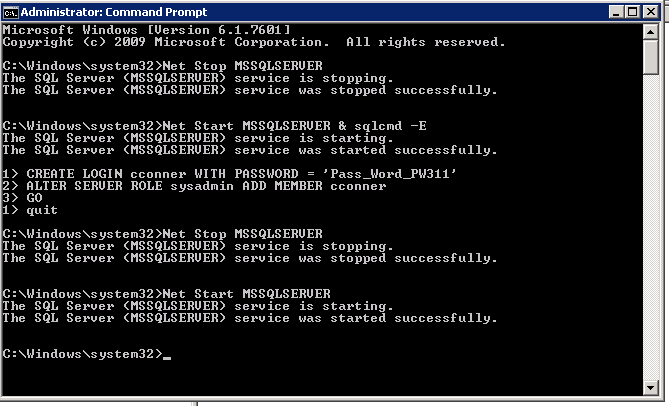
You can also accomplish the task in SSMS but don’t connect the object explorer because that counts as a connection and you can’t run a query at the same time because that would be two connections. Just hit new query, connect to instance, then add your login and make it sa.
If you are having trouble getting the error that only one administrator can connect, you can try to disable TCP\IP 
If you used SQL Server Configuration manager to start the service in single use mode, remove the parameter you added. Then start the SQL Service normally. That should be it. Now you get to look over the server and do a security audit.
 Cris Conner's SQL Blog
Thanks for posting this. Could come in handy.
LikeLiked by 1 person
Thank you for this timely information, coincidentally, I am just now facing precisely this dilemma.
LikeLiked by 1 person